






American Airlines review
 Analysis by Appsdrops
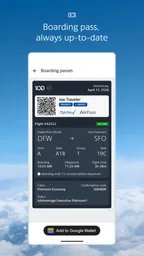
Travel days can feel crowded with small tasks: checking a flight, getting ready to check in, and keeping trip details close at hand. The American Airlines app brings those basics into one mobile place, which is the main reason I’d keep it handy when flying with the airline. It is free to download, and its promise is straightforward: help you view your flight, check in, and handle more of the journey from your phone.
A practical starting point for travel day
My baseline routine with the American Airlines app would be simple: open it when planning a trip, check the flight information, then return when it is time to check in. That approach keeps the app focused on what matters most during a journey instead of turning every visit into a search through unrelated travel tools. The app is built around American Airlines, so it makes the most sense for passengers whose flights are with the carrier.
That focused purpose is useful in the moments when I want a quick look rather than a full planning session. A travel app can be most valuable when it makes the next step easy to find. Here, the central tasks named by the app itself—viewing a flight and checking in—give a clear starting point. I’d treat it as a companion for managing the airline part of a trip, while keeping broader plans such as hotels, ground transport, and sightseeing organized in whatever tools I already use.
The first thing I’d do after installing it is make sure I can identify the trip I need to manage. Once the relevant flight is available in the app, I’d use that view as my reference point and return to it as the travel date gets closer. This repeatable habit is more dependable than opening the app only when I’m already rushing through an airport. It also makes it easier to remember where to look when I need flight details or want to begin check-in.
The app has been available since February 7, 2011, and its current version is 2026.34. Those details suggest a product with a long history and ongoing version updates, though the most important thing for a passenger is still whether the everyday workflow feels clear on their own device. It supports Android 8.0 and later, giving many Android users a straightforward way to check compatibility before installing.
Keep the trip view at the center
For a smoother routine, I’d make the flight view the place I return to rather than trying to remember every detail from a booking confirmation. Before leaving home, I’d review the trip in the app, then check it again as travel day approaches. The benefit is not a magical shortcut; it is simply reducing the number of places I need to consult for the airline side of the journey.
I’d also avoid assuming that a phone app replaces every other travel document or personal reminder. A sensible setup is to use the app for the flight and check-in tasks it is designed to support, while keeping essential trip information accessible in a way that works for me. That balance makes the app useful without asking it to serve as an all-purpose travel organizer.
Check the setup before you need it
Settings are worth checking early, even when an app’s main appeal is convenience. I’d review the options available on my device and in the app, then choose an arrangement that makes it comfortable to use while traveling. I wouldn’t wait until the airport to learn how the app behaves on my phone or decide whether I want its available alerts and display preferences.
It’s also worth checking that the app is current and that the phone itself is ready for the trip. Keeping the software up to date can make the experience more dependable, while checking compatibility before installing avoids an unnecessary surprise. These are ordinary preparation habits rather than special tricks, but they can make a real difference when time is tight.
Notifications are a personal choice. If I want travel updates on my phone, I’d review the relevant notification settings and decide what level of interruption suits me. If I prefer fewer alerts, I’d keep that preference in mind too. The right setup depends on how I travel and how I manage information; a useful app should fit into that routine rather than dictate it.
Build a faster repeatable pattern
Experienced travelers often save time through consistency, not secret features. I’d use the same sequence each time: check the trip, confirm the flight details I need, and return when check-in is available. Following a familiar order helps me avoid needless tapping and keeps the important task in view. It is a small habit, but repeated across trips it makes the app feel more approachable.
I’d also make the app easy to reach on my phone, using the device’s ordinary home-screen organization rather than hunting through folders at the last minute. That is a general phone shortcut, not a hidden function inside the app. Pairing quick access with a predictable check-in routine is a practical way to make the American Airlines app more useful without relying on assumptions about features that may not be part of a particular version.
Another helpful pattern is to check the app at deliberate moments: while preparing for departure, before heading to the airport, and when I’m ready to take care of check-in. I wouldn’t keep reopening it without a reason. A focused check is easier to manage than repeatedly searching for updates, and it leaves more attention for the rest of the travel day.
When traveling with someone else, I’d agree on who is handling the airline app and who is keeping track of other plans. That simple coordination can prevent duplicated effort and confusion. The app can support an individual passenger’s airline workflow, while the group keeps a shared understanding of the broader itinerary.
Know what the app is—and what it isn’t
The app’s strength is its clear connection to American Airlines, not a claim to manage every part of travel. I’d use it for airline-related tasks and keep expectations grounded in that role. Travelers who want one place for every booking, every carrier, and every local activity may still need additional tools. That is not a flaw so much as a practical boundary for an airline-specific app.
It’s also sensible to plan for ordinary mobile constraints. A phone may have limited battery, a weak connection, or other interruptions during a journey. I’d check the information I need before I’m under pressure and keep my device ready for travel. This is good preparation for any mobile travel service, rather than a claim about a particular offline mode or a guarantee that every detail will be available in every circumstance.
People who fly only occasionally may appreciate having the core tasks gathered in one place, while frequent passengers may value the repeatable routine. In either case, the app is most helpful when I know why I’m opening it. A clear purpose—viewing a flight or checking in—keeps the experience manageable and avoids expecting it to replace personal planning.
A well-established airline companion
The app has a substantial audience, with more than 10 million installs, an average rating of 4.8, around 294,000 ratings, and roughly 24,000 written reviews. Those figures show broad adoption and generally positive feedback, though individual experiences naturally depend on a traveler’s needs, device, and trip. I’d use popularity as a useful sign of familiarity, not as a promise that every interaction will be perfect.
For a first-time user, I’d begin with the basics and resist the urge to configure everything at once. Find the flight, get comfortable with the main screen, and check the available options at a calm moment. Once that feels familiar, it’s easier to develop a routine that fits the way I travel. The free price also makes trying it a low-commitment way to see whether an airline-focused app suits my habits.
For repeat users, mastery is less about discovering obscure controls and more about making the ordinary workflow reliable. Keep the app easy to reach, review its settings when needed, and check the trip at sensible points. Those small habits can make travel preparation feel more orderly without inventing capabilities or treating the phone as the only source of truth.
Overall, I see the American Airlines app as a practical travel companion for passengers who want to view a flight and check in from their phone. Its airline-specific focus gives it a clear role, and its long-running presence and broad adoption make it a familiar option for many travelers. I’d recommend it to American Airlines passengers who prefer a simple, repeatable mobile routine, while keeping wider trip planning separate. Used with reasonable expectations, it can help make the airline portion of a travel day easier to manage.
What we like
- Mobile check-in makes getting a boarding pass straightforward.
- Flight alerts help travelers stay informed about schedule changes.
- The app can store travel details for easier access on the go.
- Seat selection is available for many flights through the app.
- AAdvantage members can track miles and account activity.
What could be better
- Some features require an AAdvantage account.
- Seat selection may involve an additional fee.
- Flight details can take time to update after schedule changes.
- The app depends on a stable internet connection for many tasks.
- Disruptions may make rebooking options difficult to navigate.





