





Allegiant review
 Analysis by Appsdrops
I find the Allegiant app most useful when a trip is already taking shape: it gives Allegiant passengers a place to manage airline-related travel from a phone rather than treating each task as a separate search. That focus is also its main limitation. It is an airline companion, not a broad travel planner, so its value depends on whether Allegiant is part of your journey.
What the free price means in practice
The app is free to install, and Allegiant Travel Company publishes it for Android and iOS travelers. That makes trying it a low-commitment choice: you do not need to pay simply to see whether an airline-specific app fits your routine. The free price is a useful starting point, but it should not be mistaken for a promise that every part of a trip or every travel option is free. Airline fares and any other trip costs are separate from downloading the app.
I would judge its value by convenience rather than by the price alone. If Allegiant is your carrier, having a dedicated place for airline tasks can be more practical than repeatedly switching between a browser, email, and other travel tools. If you rarely fly with Allegiant, the same free download may add little to your phone; an app you seldom open is not automatically useful just because it costs nothing.
It is an Everyone-rated travel and local app, and the current Android version is 7.10.7, with Android 6.0 as the minimum operating-system requirement. Those details make it straightforward to assess basic compatibility before installing. I would still check that your device has the current app-store version available, especially if you are relying on it close to departure.
A focused tool rather than a complete travel organizer
In day-to-day use, I would think of Allegiant as the airline-specific layer of a trip. It belongs alongside whatever you use for hotels, ground transport, maps, or plans at your destination, rather than replacing all of those services. That distinction matters: a focused app can make airline tasks easier to find, but it is not the right place to expect a unified itinerary covering every company involved in your travel.
Compared with a general travel app, its advantage is relevance when Allegiant is the airline you need to deal with. A general planner may bring together reservations from different providers, while an airline app is naturally centered on one carrier. If you are comparing flights across several airlines, I would use broader search tools first and turn to Allegiant when you want to handle the Allegiant part of your plans.
Where the app earns its place
The clearest benefit is having a mobile point of contact for a trip involving Allegiant. Instead of treating airline information as something you only look up during booking, you can make the app part of your preparation routine. I would install it once I knew I was traveling with Allegiant, then use it as a dedicated place to check the airline side of the journey when planning or preparing to leave.
A useful, often-overlooked habit is to separate airline management from general trip research. I would use a broader service to compare destinations and travel options, then keep Allegiant for tasks tied specifically to an Allegiant itinerary. This reduces the temptation to make one app serve every purpose, and it makes it easier to know where to look when you need carrier-specific information.
Another practical tip is to prepare before the airport rather than first opening the app in a rush. Check that you can sign in and find the relevant trip while you have time to troubleshoot. That simple test is worthwhile with any airline app: an app is most helpful when access works before you are juggling bags, transport, and a departure time. I would not make a last-minute airport visit the first time I try to use it.
For a family or group trip, I would also decide in advance who is responsible for handling the airline details. One person keeping track of the carrier’s side can be less confusing than several travelers independently trying to manage the same plans. The app can serve as that person’s Allegiant-focused tool, while the group uses a separate shared method for hotel addresses, meeting points, and other arrangements.
Everyday scenario: getting ready for a flight
Imagine I have an Allegiant trip coming up and am packing the night before. I would open the app while I am calm, locate the trip-related information I need, and make sure I can access it before leaving home. I would keep destination details and arrangements with other providers in their own places, rather than assuming the airline app will cover them. In the morning, that division makes the airline portion easier to find without turning the app into a catch-all.
This workflow is especially useful if you prefer to prepare on a phone instead of searching through old messages. It is less helpful if you travel with several airlines on the same itinerary and want one app to coordinate everything. In that case, I would keep a general itinerary tool or a carefully organized email record as the central reference, then use Allegiant only for its own part of the journey.
The tradeoffs I would keep in mind
An airline-focused app can be convenient, but it also ties its usefulness to one company. If your travel plans change to a different carrier, Allegiant may no longer be central to that trip. A multi-airline traveler may therefore end up maintaining several airline apps as well as a broader planner. That is a real convenience tradeoff: specialized tools can make carrier-specific tasks feel more direct, but they can also fragment trip information.
The average rating is 3.2 from around 18,000 ratings, alongside about 8,400 written reviews. I would read that as a reason to keep expectations measured rather than assuming every interaction will feel effortless. Ratings do not tell me which situation a particular traveler encountered, and they cannot predict how the app will behave on every device, but the overall score is a sensible reminder to test access before relying on it for a time-sensitive task.
I would also avoid making the app my only source of essential travel details. Keeping a booking confirmation or other important trip information accessible separately is a sensible backup, especially if you are traveling somewhere with unreliable connectivity or you run into an account-access issue. That is not a criticism unique to Allegiant; it is a practical precaution whenever an important journey depends on a phone.
Another tradeoff is that an airline app is most valuable when you actually have a reason to use that airline’s services. If you are only browsing destinations or comparing schedules across carriers, installing a dedicated app too early may add another step rather than simplify your decision. I would first decide whether Allegiant is relevant to my plans, then install its app when I have a concrete reason to manage an Allegiant trip.
Who is most likely to get value
I would recommend trying it to people who fly with Allegiant and prefer to keep airline-related activity on a phone. It is also a reasonable choice for occasional travelers who want to prepare ahead rather than rely entirely on browser searches and scattered messages. With more than five million installs, it has clearly found an audience, though that figure alone does not say whether it suits any particular traveler.
It is a less compelling choice for someone who never uses Allegiant, or for a frequent traveler who expects one app to cover bookings across multiple airlines and the rest of a trip. Those users may be better served by a general travel organizer as their main tool. They can still install Allegiant if a particular journey calls for it, but there is little reason to make it the center of their travel routine otherwise.
If you are helping another person prepare for a flight, the best approach is to have them install and open the app themselves before departure, rather than assuming you can manage everything on their behalf. That gives them a chance to confirm they can access their own trip information and become familiar with where they need to go. For a traveler who is uncomfortable with apps, a printed or separately saved confirmation can still be a useful fallback.
My verdict on whether to install it
For an Allegiant passenger, I think the free app is worth trying as a focused companion, especially if you value having airline-related tasks in one mobile place. I would use it alongside—not instead of—general planning tools, and I would check that I can access my trip before travel day. Those two habits capture both its practical appeal and the limits of relying on any single airline app.
If you are deciding whether to keep it, ask one simple question: will I use Allegiant for an upcoming trip? If yes, the no-cost download makes experimentation easy, and the app may help make the airline portion of that trip more convenient. If not, a general travel app or your existing planning routine is likely enough. My recommendation is therefore specific: install it when Allegiant is part of your plans, but do not expect it to replace a complete travel organizer.
What we like
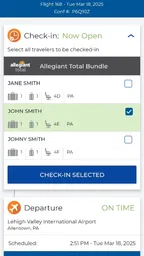
- The app supports mobile check-in for eligible Allegiant flights.
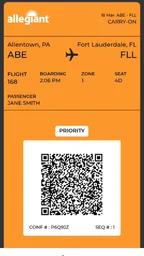
- Boarding passes are easy to access from a phone.
- Travelers can review flight details in one place.
- The app lets users manage bookings on the go.
- It provides access to Allegiant’s route and flight information.
What could be better
- Some trips may not support every in-app feature.
- Flight changes can require contacting customer service.
- Optional extras can increase the total trip cost.
- App performance may vary with network connectivity.
- Travelers may need separate apps for other airlines.





