




Alaska Hawaiian review
 Analysis by Appsdrops
When several people in a household are traveling, the hard part is often not choosing a flight; it is keeping each person’s plans straight without passing around passwords or relying on a pile of screenshots. Alaska Hawaiian is worth considering if Alaska Airlines is part of those plans. I see it as a practical travel companion for checking and managing your own trip, rather than a shared family dashboard. That distinction matters: it can help household members stay organized, but each traveler should keep their own account and booking details under their control.
One household trip, separate traveler accounts
The app comes from Alaska Airlines and sits in the travel and local category. It is free to download, and its broad purpose is to put airline-related travel tasks on a phone. In a shared-use situation, that can be useful when one person books a trip for several relatives but everyone still wants to check their own itinerary. I would treat the app as a personal travel tool, not as a place where the whole household should sign in to one account.
For example, imagine two adults coordinating a weekend away while one is also arranging travel for a teenager. The person who made the booking can use their own airline account to keep track of the reservation, while another traveler can use their own access where appropriate. Before departure, the household can agree on the flight details and share the relevant information through a method everyone already uses. That avoids the confusion of handing one unlocked phone around at the airport.
This is a useful distinction from a general travel organizer. A third-party itinerary app may be better when a group wants one combined view of flights, hotels, and activities across several airlines. Alaska’s app makes more sense when the task is specifically keeping up with travel involving Alaska Airlines. Its focus is a strength for those trips, but it is not a substitute for a household calendar or a shared itinerary service.
Start with clear account boundaries
My practical advice is to decide who will manage each reservation before installing the app or signing in. The traveler whose account is being used should keep their password private, particularly on a phone that children or guests also use. If one adult handles booking for the household, they can still communicate departure details without making their account a shared family login.
On a shared device, sign out when you are finished and avoid leaving booking screens open for the next person. That is ordinary good account hygiene, but it is especially relevant when a phone is passed between relatives or used by a child for entertainment. I would also check the device’s lock settings and notification previews: travel details appearing on a locked screen may be convenient for the owner but less appropriate on a communal tablet or phone.
There is a trade-off here. Keeping one person responsible for the airline account reduces the chance of several people changing or misunderstanding the same reservation, yet it can create a bottleneck if that person’s phone is unavailable. For a trip with multiple adults, agree in advance who can answer questions and how the booking information will be shared. The app can support the account holder’s travel routine; household coordination still depends on clear communication.
Coordinate before the airport rush
The most useful time to make a plan is before anyone is standing in a queue. I would have the booking owner check the trip in the app and then send the key details to the other travelers in a group conversation or calendar. Keep the message focused on what the group needs to act on—such as when to leave home and where to meet—rather than forwarding account access. This simple workflow can prevent a common problem: one relative knows the flight information, while everyone else assumes someone else has it.
For families traveling with children, it also helps to assign one adult as the point person for airline-related questions. A second adult can keep a copy of the basic itinerary in an agreed place, without logging into the first person’s account. If plans change, the account holder can check the airline app and relay the update. That arrangement is less seamless than a true shared-control system, but it keeps responsibility understandable and reduces the temptation to pass a phone back and forth during a stressful moment.
There is another small but valuable habit: review the itinerary together at home, then let each traveler know what information they personally need to remember. A child may only need to know which adult to stay with; an older teen may need the departure plan and meeting point. The app is not the household’s communication system, so it works best when paired with a clear plan rather than expected to coordinate people by itself.
What the audience and reputation suggest
The app is rated for Everyone, which makes it broadly suitable as a travel utility from an age-rating perspective. That should not be confused with a recommendation to give a child access to an adult’s airline account. I would let younger travelers use a device only with an adult’s supervision, and I would avoid storing a family member’s login on a phone that changes hands frequently. Age suitability for the app and sensible account access are separate questions.
Its audience is substantial: it has more than five million installs, an average rating of 4.1, and around 91,000 ratings, alongside roughly 30,000 written reviews. Those figures suggest that many travelers use it, but they do not tell me whether it suits a particular household’s habits. A frequent Alaska Airlines customer has a clearer reason to keep it installed than someone who flies with many different carriers and wants one neutral place to organize every trip.
For an airline-focused task, I would generally start with the carrier’s own app rather than a generic travel tool, because that is the natural place to manage the relationship with that airline. For mixed-carrier travel, a broader itinerary organizer may be more convenient for seeing the whole journey at once. Neither choice is universally better: it depends on whether the household values airline-specific access or a combined view across providers.
Useful limits to keep in mind
The main limitation from a household perspective is that an airline app should not be mistaken for a family collaboration product. A shared screen does not automatically mean shared permissions, and a single account is not a good substitute for deciding who is responsible for a booking. If your family expects everyone to edit one master travel plan, or wants flights and non-flight arrangements kept together, you may find a calendar or general itinerary tool more appropriate alongside the airline app.
I would also avoid making the app the only way the household knows where to go. Phones can be out of battery, left at home, or unavailable to the person who booked. Before leaving, make sure the group knows its meeting point and who to contact if separated. This is not a criticism unique to Alaska; it is a sensible backup for any mobile travel routine. The app is most helpful when it reduces last-minute uncertainty, not when the entire plan depends on one device.
Alaska Airlines has released the app on November 1, 2011, and the current version is 8.25.0. It requires iOS 8.0 or later. I would still check that a particular phone can install and run the current release before depending on it for a trip, especially if someone in the household uses an older device. The app is free, so trying it ahead of travel is a low-commitment way to see whether its airline-specific approach fits your routine.
My household verdict
I would recommend this app to a household that flies with Alaska Airlines and wants the person responsible for a booking to have a dedicated place to manage their airline travel. It can fit neatly into a shared trip plan, provided each person’s account remains their own and the group agrees how updates will be passed along. It is less compelling as the household’s only organizer when several carriers, hotels, and activities need to appear together.
In my view, the best setup is modest: install it on the primary traveler’s personal phone, keep account access private, review the plan before departure, and share essential logistics through a channel the whole group can reach. For children, use age-appropriate supervision rather than assuming an Everyone rating settles questions about account access. That combination makes the app useful without asking it to do a job it was not designed to do.
If Alaska Airlines is central to your travel, I think it is a sensible free app to keep available. If your household mainly needs a shared, cross-airline itinerary or collaborative planning space, choose a broader organizer for that role and use this one only for the airline-specific part. That is the clearest way to get value from it while keeping coordination simple and account boundaries intact.
What we like
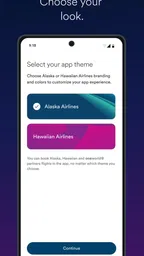
- Combines Alaska Airlines and Hawaiian Airlines travel information in one app.
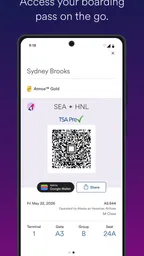
- Supports mobile boarding passes for convenient airport check-in.
- Provides flight status updates to help track travel plans.
- Offers access to trip details and itinerary information.
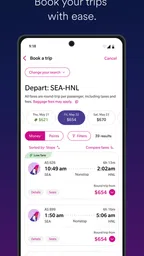
- Lets travelers manage reservations from a mobile device.
What could be better
- Some features may require an airline account to access.
- App usefulness is limited to travelers flying with these airlines.
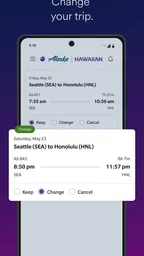
- Flight changes can still require help from airline staff.
- Availability of app features may vary by route or booking.
- A stable internet connection is needed for many functions.





